

VitalsPro HMS
Hospital management software for Indian hospitals
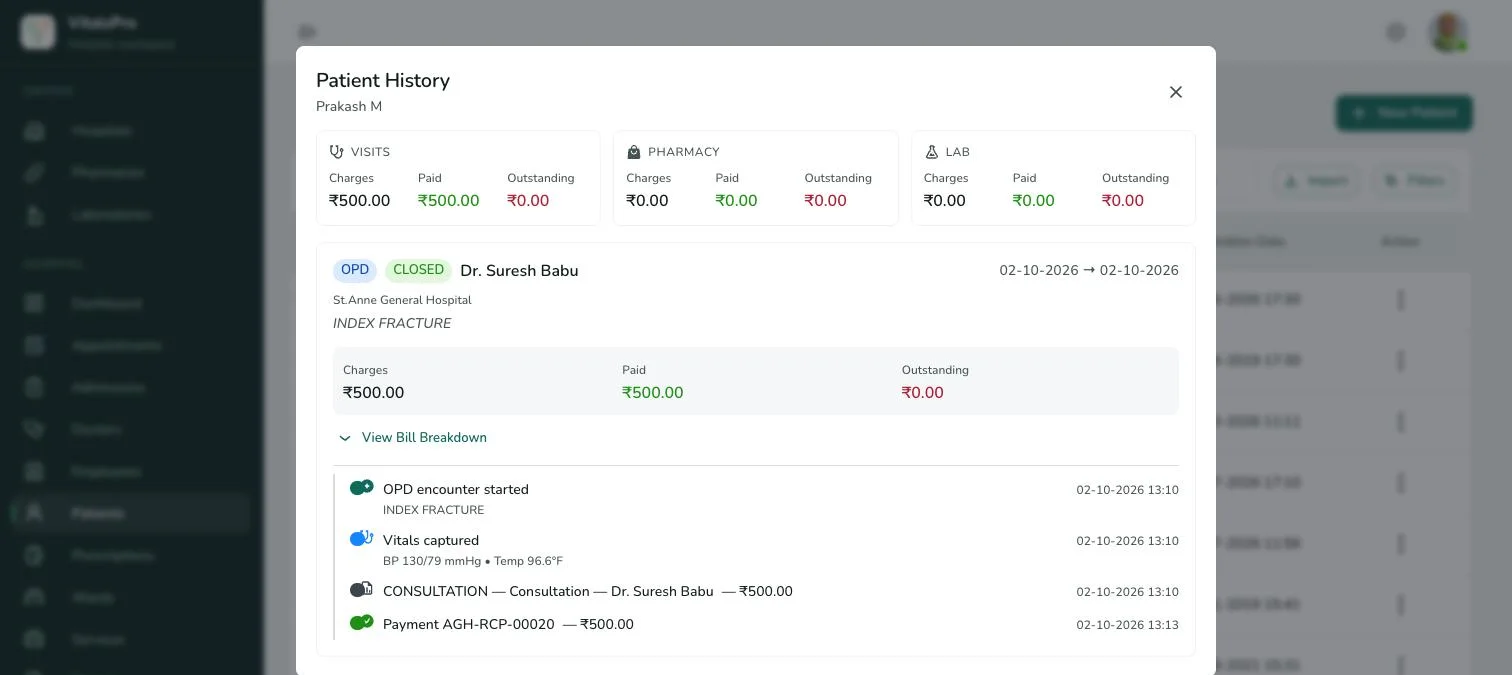
Run OPD, admissions, patient records, billing, pharmacy and lab from one cloud login. Built for small and mid-sized hospitals that want one system instead of four, starting this week.
- Up to 3
- branches on HMS Pro
- 15 users
- on HMS Pro
- Same day
- self-onboarding
- Free
- assisted setup & data migration
The problem
Four systems, one patient, and nobody sees the whole picture
Most small hospitals run OPD on one tool, the lab on another, the pharmacy on a third and billing on paper. Hospital management software should end that, not add to it.
Details typed again and again
Reception, lab and billing each re-enter the same patient, and every copy is a chance for a mistake.
Charges slip through
A bed-day, a test or a medicine that never reaches the bill is revenue the hospital simply loses.
No live view of the day
Admissions, occupancy and collections arrive in end-of-day registers, long after anyone can act on them.
A day with VitalsPro
One patient record, from the front desk to the final bill
Every step writes to the same record, so nothing is re-entered and nothing is lost between departments.
- 01
8:30 am
Registration
The front desk registers the patient once and books an OPD slot against the doctor’s availability.
- 02
Morning OPD
Consultation
The doctor sees vitals and history on one screen, then writes the prescription and any lab orders.
- 03
Late morning
Lab and pharmacy
The lab order lands on the lab worklist; the prescription is visible at the pharmacy counter.
- 04
Afternoon
Admission
If the patient is admitted, ward and bed are assigned and bed occupancy updates on the dashboard.
- 05
Discharge
One clean bill
Consults, bed-days, tests and medicines flow into a single bill, ready for payment.
- 06
End of day
The owner’s view
Revenue collected, admissions and pending lab reports are on the dashboard without anyone compiling a register.
01 · OPD, IPD, EMR and billing
Hospital management software that covers every department
VitalsPro HMS software runs appointments, admissions, wards, doctors, patients, prescriptions and services from one login. Each department reads from and writes to the same patient record.
- Appointment scheduling by doctor availability
- Admissions, wards and bed occupancy
- Patient management: inpatient and outpatient records with reports
- Doctors, staff, leave and attendance
02 · IPD and wards
Admissions, wards and live bed occupancy
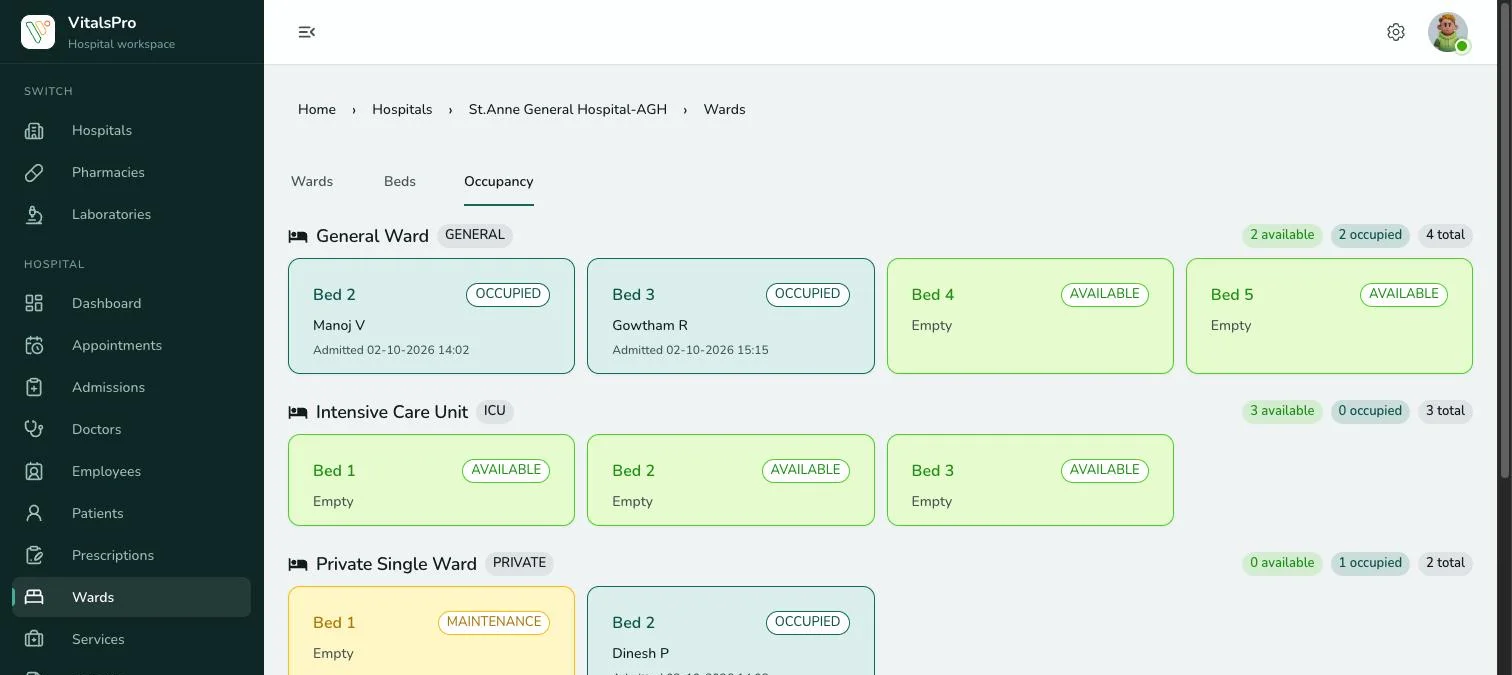
Admit a patient to a ward and bed, and the bed board updates for everyone: occupied, available or under maintenance, ward by ward, with who is in each bed and since when.
- Wards with category, floor and daily rate
- Bed board: occupied, available, maintenance
- Emergency and planned admissions
- Transfer bed and discharge from the admission
03 · Hospital billing
Hospital billing software: one inpatient bill, with advances and every counter
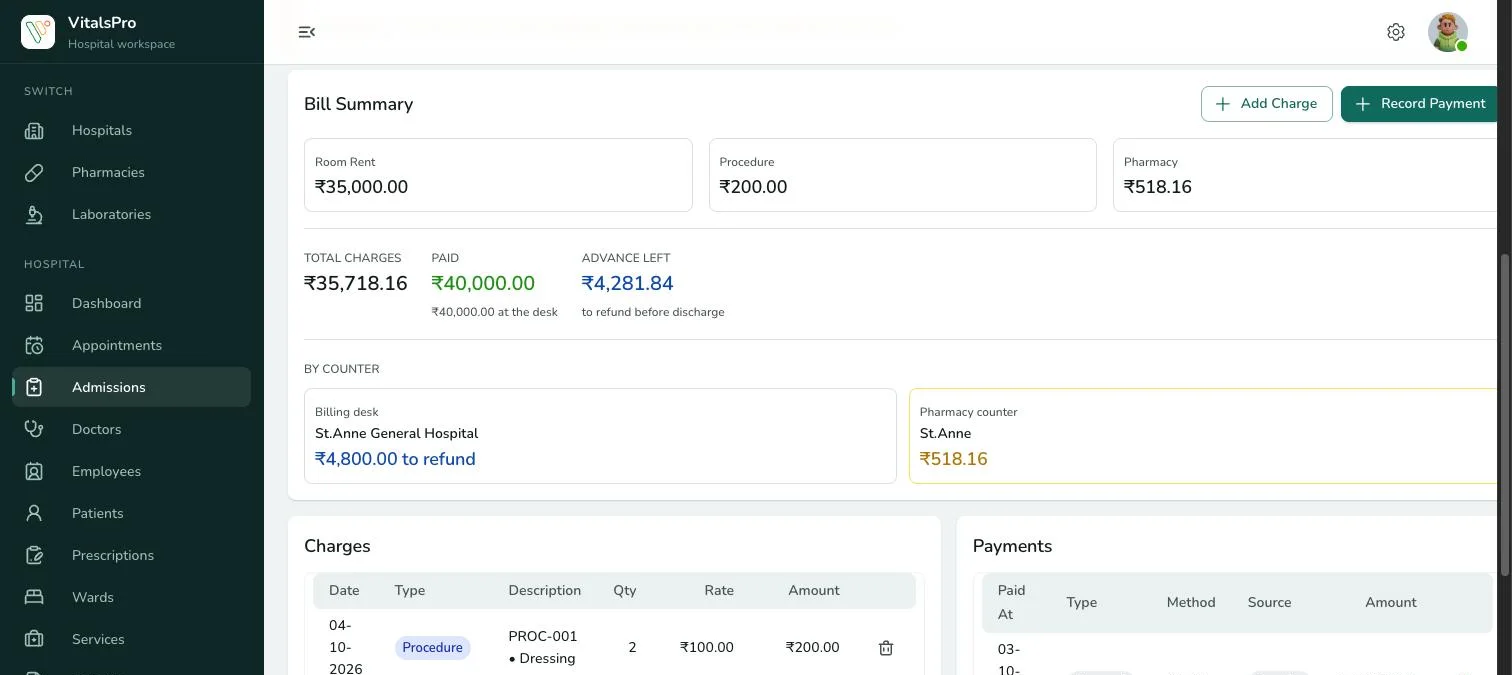
Room rent, procedures and pharmacy charges collect on the admission’s bill. Advances are tracked as they are used, the desk is warned when they run low, and each counter’s share is clear before discharge.
- Charges by category: room, procedure, pharmacy
- Advance collected, used and left to refund
- Low-advance warning at the billing desk
- Payments by method and source
04 · Real-time dashboard
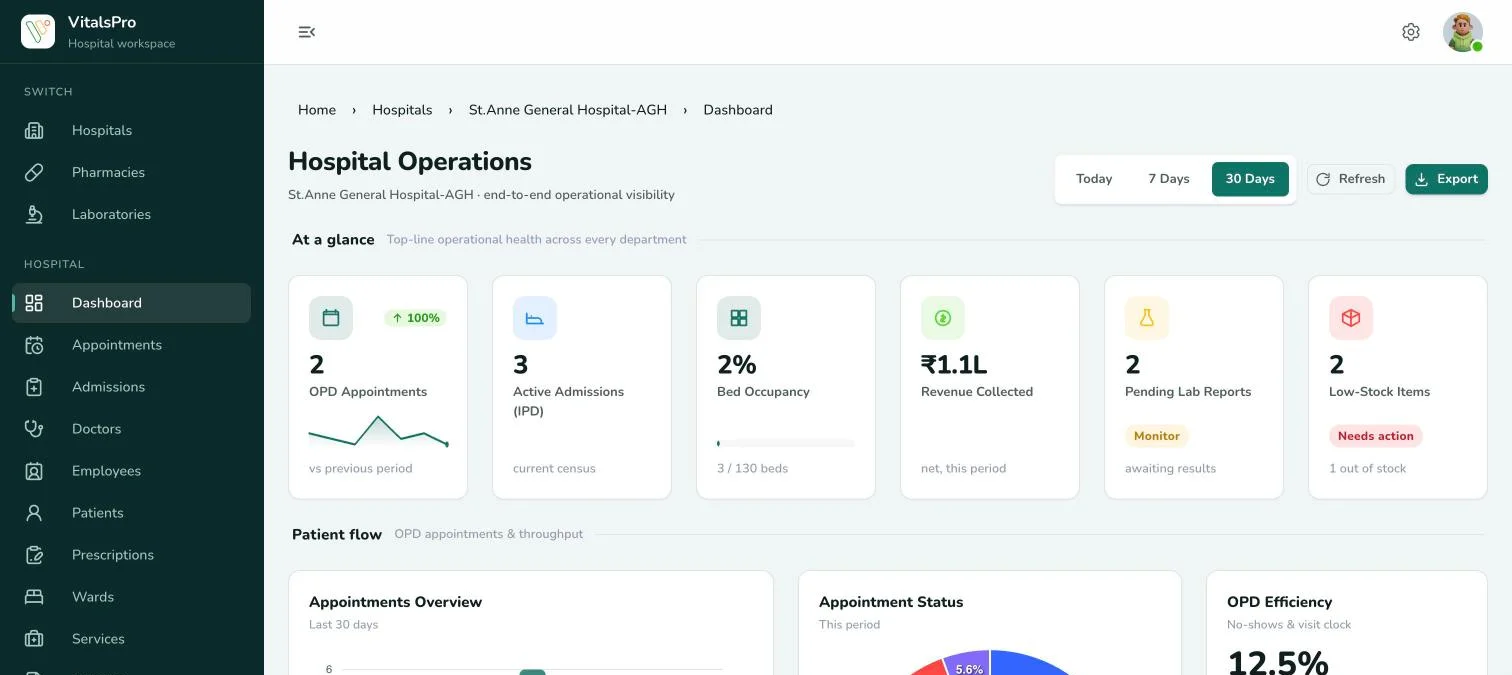
Hospital operations at a glance
See OPD appointments, active admissions, bed occupancy, revenue collected, pending lab reports and low-stock items for today, the last 7 days or 30 days.
- Live OPD, admission and occupancy figures
- Net revenue collected, with trends
- Pending lab reports and low-stock alerts
- No-show rate and wait versus consult time
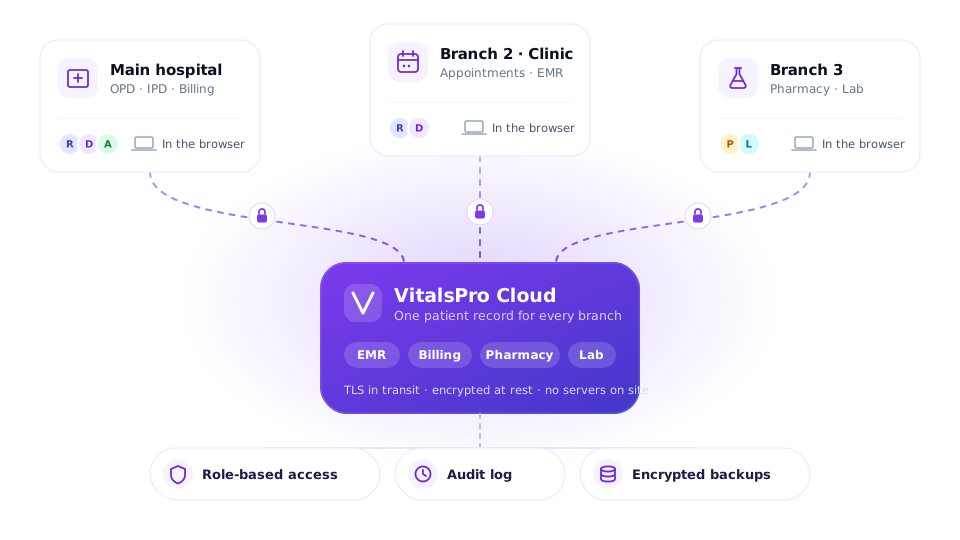
05 · Cloud and multi-branch
One hospital or three branches, no servers on site
VitalsPro runs in the browser on computers you already have. HMS Pro covers up to three branches and fifteen users, with role-based access for every member of staff.
- Role-based access for reception, doctors and admins
- Audit log of every view and change
- Encrypted backups with point-in-time recovery
- Blood bank, oxygen and ambulance tracking on Pro
What changes
What a hospital gets from one system
Fewer missed charges
Every consult, bed, test and medicine reaches the bill because it was recorded once, at source.
Shorter waits at each counter
Patients are not re-registered at the lab, pharmacy or billing desk.
Decisions on today’s numbers
Occupancy, collections and pending work are visible while the day is still running.
Clear accountability
The audit log shows who viewed or changed a record, and when.
Trust & security
Patient and business data, protected
The same controls on every plan.
Role-based access
Reception, doctors, pharmacists and admins each see exactly what their role allows.
Audit logs
Every view and change is recorded — who, what and when.
Cloud backup
Automated encrypted backups with point-in-time recovery.
Strong authentication
Central sign-on with OAuth 2.0 / OpenID Connect.
Encryption
TLS in transit and encryption at rest for patient records.
Pricing
Hospital management software pricing
Two published plans for single hospitals and small groups, billed monthly or yearly. Hospital chains can ask for a custom Ultimate plan. Full plan details are on the [pricing page](/products/vitalspro/pricing).
Lite
Ideal for clinics and small hospitals
₹27,000/ yearor ₹2,500 billed monthly
- Single hospital or clinic
- Patient & doctor management
- Appointment scheduling
- Dashboard & basic analytics
- Pharmacy & laboratory modules
- Basic billing & reports
- Role-based access
- Up to 5 users
Pro
Best suited for growing hospitals
₹48,600/ yearor ₹4,500 billed monthly
- Up to 3 branches
- Staff, ward & department management
- Blood bank & oxygen tracking
- Ambulance management
- SMS & Email notifications
- Advanced billing & MIS reports
- Feedback & complaint management
- Up to 15 users
Ultimate
Designed for hospital chains and enterprises
Custom
- Unlimited branches
- Unlimited users
- Dedicated infrastructure
- Custom workflows & integrations
- Advanced security controls
- Priority onboarding & support
- SLA-backed uptime
“The OPD queue moves visibly faster. Patients notice, and so does our front desk.”
Getting started
Live the same day — with help if you want it
Self-onboard in minutes, or let our team set you up, migrate your records and train your staff at no cost.
Running a smaller practice, a medical store or a diagnostic lab? See clinic management software, pharmacy management software and lab management software, or compare every plan on the pricing page. Planning the move? Read what small hospitals pay for HMS and our step-by-step plan for digitising a small hospital.
- Step 1Sign upPick a plan and create your workspace — access is instant.
- Step 2Set upAdd your hospital, wards, doctors and services with guided forms.
- Step 3Go liveRegister your first patients and start billing right away.
- OptionalAssisted onboarding — freePrefer a hand? We configure your setup, migrate your records and train your staff at no cost.
- OngoingSupportDedicated success manager, WhatsApp and phone support.
FAQ
Hospital management software: common questions
See VitalsPro on your own workflows
Book a guided walkthrough, or sign up and start right away — free assisted onboarding whenever you want it.